Welcome

Passionately curious about Data, Databases and Systems Complexity. Data is ubiquitous, the database universe is dichotomous (structured and unstructured), expanding and complex. Find my Database Research at SQLToolkit.co.uk . Microsoft Data Platform MVP

"The important thing is not to stop questioning. Curiosity has its own reason for existing" Einstein


Showing posts with label SQL Server 2012. Show all posts

Tuesday, 16 June 2015

31 days of Extended Events

A came across this excellent series of blog posts by Jonathan Kehayias to help provide a jumpstart to using Extended Events.


XEvents. XEvent A Day: 31 days of Extended Events bit.ly/1GpFptP


An XEvent a Day (1 of 31) – An Overview of Extended Events
An XEvent a Day (2 of 31) – Querying the Extended Events Metadata
An XEvent a Day (3 of 31) – Managing Event Sessions
An XEvent a Day (4 of 31) – Querying the Session Definition and Active Session DMV’s
An XEvent a Day (5 of 31) – Targets Week – ring_buffer
An XEvent a Day (6 of 31) – Targets Week – asynchronous_file_target
An XEvent a Day (7 of 31) – Targets Week – bucketizers
An XEvent a Day (8 of 31) – Targets Week – synchronous_event_counter
An XEvent a Day (9 of 31) – Targets Week – pair_matching
An XEvent a Day (10 of 31) – Targets Week – etw_classic_sync_target
An XEvent a Day (11 of 31) – Targets Week – Using multiple targets to simplify analysis
An XEvent a Day (12 of 31) – Using the Extended Events SSMS Addin
An XEvent a Day (13 of 31) – The system_health Session
An XEvent a Day (14 of 31) – A Closer Look at Predicates
An XEvent a Day (15 of 31) – Tracking Ghost Cleanup
An XEvent a Day (16 of 31) – How Many Checkpoints are Issued During a Full Backup?
An XEvent a Day (17 of 31) – A Look at Backup Internals and How to Track Backup and Restore Throughput (Part 1)
An XEvent a Day (18 of 31) – A Look at Backup Internals and How to Track Backup and Restore Throughput (Part 2)
An XEvent a Day (19 of 31) – Using Customizable Fields
An XEvent a Day (20 of 31) – Mapping Extended Events to SQL Trace
An XEvent a Day (21 of 31) – The Future – Tracking Blocking in Denali
An XEvent a Day (22 of 31) – The Future – fn_dblog() No More? Tracking Transaction Log Activity in Denali
An XEvent a Day (23 of 31) – How it Works – Multiple Transaction Log Files
An XEvent a Day (24 of 31) – What is the package0.callstack Action?
An XEvent a Day (25 of 31) – The Twelve Days of Christmas
An XEvent a Day (26 of 31) – Configuring Session Options
An XEvent a Day (27 of 31) – The Future – Tracking Page Splits in SQL Server Denali CTP1
An XEvent a Day (28 of 31) – Tracking Page Compression Operations
An XEvent a Day (29 of 31) – The Future – Looking at Database Startup in Denali
An XEvent a Day (30 of 31) – Tracking Session and Statement Level Waits
An XEvent a Day (31 of 31) – Event Session DDL Events


Tuesday, 15 July 2014

Pre-SQLBits - Bristol SQL Server User Group - July Meeting


Monday 14 July saw the Bristol User Group meet with Brent Ozar talking on Are AlwaysOn Availability Groups Right for You? It was amazing that Brent came to share his in depth knowledge on AlwaysOn. He shared the pros and cons of what needs to be considered when creating this type of database architecture solution.

Brent has an amazing set of resources covering AlwaysOn. These are  found
http://www.brentozar.com/sql/sql-server-alwayson-availability-groups/ 

The Microsoft guides I found useful were:-

AlwaysOn Architecture Guide: Building a High Availability and Disaster Recovery Solution by Using AlwaysOn Availability Groups
http://msdn.microsoft.com/en-us/library/jj191711.aspx

Microsoft SQL Server AlwaysOn Solutions Guide for High Availability and Disaster Recovery
http://msdn.microsoft.com/en-us/library/ff929171.aspx

Comparison of Failover Cluster Instances and Availability Groups
The core concepts between FCIs and Availability Groups are compared in this table taken from http://msdn.microsoft.com/en-us/library/ff929171.aspx
 

For more details and caveats see the full article http://msdn.microsoft.com/en-us/library/ff929171.aspx

Saturday, 1 December 2012

BI Semantic Model (BISM)

The term BI Semanitc model has been bounded around a lot over the last year. I have come across a few really good articles which explain this in more depth.  The definition is that the  BI Semantic Model is one model for all end user experiences.

Here are my a few of articles that clearly explain this term with a really helpful diagram. 

Updated: Analysis Services – Roadmap for SQL Server Code Name “Denali” and Beyond
http://blogs.technet.com/b/dataplatforminsider/archive/2010/11/12/analysis-services-roadmap-for-sql-server-denali-and-beyond.aspx

So, what is the BI Semantic Model?
http://cwebbbi.wordpress.com/2012/02/14/so-what-is-the-bi-semantic-model/

Understanding the SQL Server 2012 BI Semantic Model (BISM)
http://www.mssqltips.com/sqlservertip/2818/understanding-the-sql-server-2012-bi-semantic-model-bism/

Saturday, 21 July 2012

SQL Server 2012 Install by Configuration File

Automating a SQL Server installation for unattended installation creates a consistent deliverable for a SQL Server build.

To create the configuration file run through the GUI installation selecting your predefined defaults and prior to clicking Install collect the configuration file from the specified path listed on the Ready to Install page e.g.  C:\Program Files\Microsoft SQL Server\110\Setup Bootstrap\Log\20120619_140314\ConfigurationFile.ini


The configuration file will need additional configuration details for unattended use as sensitive information is not included.
  •  IACCEPTSQLSERVERLICENSETERMS is required to acknowledge acceptance of the license terms. 

  • The QUIET and QUIETSIMPLE settings are required to allow the Setup to display progress only, without any user interaction.

A few parameter may need updating between server builds.

Security

The other sensitive information which is not written to the configuration file are the passwords. These can be passed into the installation configuration at run time using

Setup.exe /SQLSVCPASSWORD="************" /AGTSVCPASSWORD="************" /ISSVCPASSWORD="************" /SAPWD="************"
/ConfigurationFile=DefaultConfigurationFile.INI

The Service and SQL account parameters are:

SQLSVCPASSWORD: Account for SQL Server service: Domain\User
AGTSVCPASSWORD: Agent account name: Domain\User
ISSVCPASSWORD:  Account for Integration Services: Domain\User
RSSVCPASSWORD:  Account for Reporting Services: Domain\User
ASSVCPASSWORD: Account for Analysis Services: Domain\User
SAPWD:  Specifies the password for the SQL Server sa account.

The Microsoft article that describes the install of SQL Server 2012 using a configuration file can be found here http://msdn.microsoft.com/en-us/library/dd239405.aspx. A full list of parameters are stated here http://technet.microsoft.com/en-us/library/ms144259


Sunday, 1 July 2012

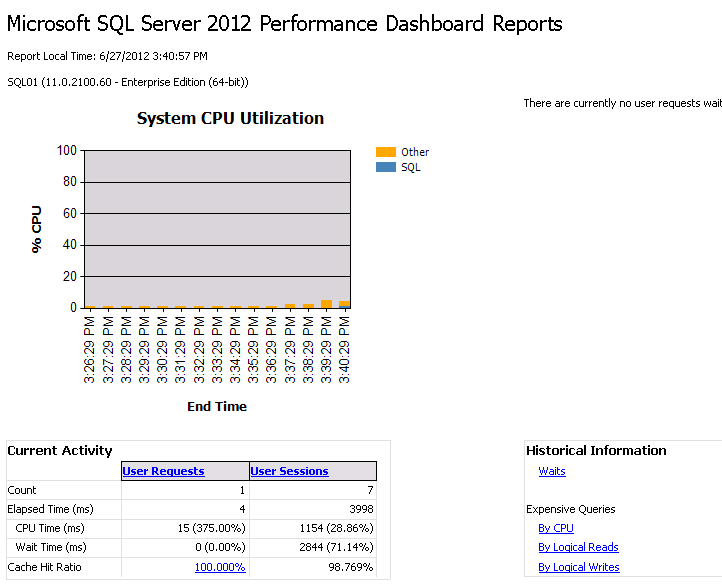
Performance Dashboard Reports

The new custom  Performance Dashboard Reports for SQL Server 2012  can be obtained from http://www.microsoft.com/en-gb/download/details.aspx?id=29063

As with the earlier versions of these reports they allow a database administrator to quickly identify whether there is a current bottleneck on the system, and capture additional diagnostic data that can help resolve some common problems such as:

  • Common performance problems that can be indeitifed through the dashboard are CPU bottlenecks (and what queries are consuming the most CPU)
  • IO bottlenecks (and what queries are performing the most IO)
  • Index recommendations generated by the query optimizer (missing indexes)
  • Blocking
  • Latch contention
Deployment

There are 3  parts to the deployment process.

  1.  Run the run installer. The dashboard automatic install path places the files in C:\Program Files (x86)\Microsoft SQL Server\110\Tools\Performance Dashboard.
  2. In the Performance Dashboard folder execute the setup.sql script.
  3. Test the deployment by opening a report. Open the report by selecting the server instance in SQL Server Maangement Studio (SSMS) and in the menu options select Reports, then; Custom reports and navigate to the install path C:\Program Files\Microsoft SQL Server\110\Tools\Performance Dashboard. Then select  performance_dashboard_main.rdl and Click open and select Run.


Thursday, 24 May 2012

SQL Relay


I attended SQL Relay 2012 in Clifton, Bristol yesterday which brought together  SQL experts from the southwest. The location was fantastic at the Avon Gorge Hotel which overlooks Brunel’s suspension bridge. The al fresco dining for lunch in the glorious Sun added to the interesting SQL discussions.

There were overview sessions from Microsoft in the morning on SQL Server 2012 and Deep Dive sessions in the afternoon from SQL Server MVP's.

The morning sessions delivered by Microsoft by Morris Novello, SQL Server Product Manager and Andrew Fryer, Technical Evangelist discussed the explosion of data volumes, new innovations in the cloud and new development features within SQL Server 2012. The practical overview of SQL Server 2012 new features showed the breadth and depth of the changes to the product which will take SQL Server to a new level.

The afternoon MVP’s Tony Rogerson covered SANless high availability with Always On and Martin Bell covered Distributed Replay. Considering disk geometry added an interesting dimension to Always On and being able to mitigate risk against hardware consolidation and changes using distributed replay was insightful.

Friday, 27 April 2012

SQL Server 2012 Databix

Enriched SQL-Flavoured cereal to nourish you and your customers


With three new ingredients to fortify customers and partners!


Wednesday, 11 April 2012

SQL Server 2012 Certifications

The article 'Move Your Career to the Cloud with the Microsoft Certified Solutions Expert certification' sets out details of the new certification.
http://blogs.technet.com/b/nraja/archive/2012/04/12/move-your-career-to-the-cloud-with-the-microsoft-certified-solutions-expert-certification.aspx

This new set of SQL Server certifications aims to provide a broader and deeper set of technology skills. The new certification is across technology solutions based on cutting-edge technologies for both On-premise or in the cloud solutions. The certification details are

Microsoft Certified Solutions Associate (MCSA)
http://www.microsoft.com/learning/en/us/certification/cert-sql-server-MCSA.aspx
Exam 461 Querying Microsoft SQL Server 2012
Exam 462 Administering a Microsoft SQL Server 2012 Database
Exam 463 Implementing Data Warehouses with Microsoft SQL Server 2012
  • To transition your certification
    • Exam 457 Part 1
    • Exam 458 Part 2
Microsoft Certified Solutions Expert (MCSE) Data Platform
http://www.microsoft.com/learning/en/us/certification/cert-sql-server-data-platform.aspx?WT.mc_id=v3_MSL_social_MCSEDP

Exam 464 Developing Microsoft SQL Server 2012 Databases
Exam 465 Designing Database Solutions for SQL Server 2012

  • To transition your certification
    • MCITP: Database Administrator 2008
    • Exam 457 Part 1
    • Exam 458 Part 2
    • Exam 459 Transition your MCITP: Database Administrator 2008 to MCSE: Data Platform
MCSE: Business Intelligence
Further details of this route are here:-
http://www.microsoft.com/learning/en/us/certification/cert-sql-server-business-intelligence.aspx

Sunday, 1 April 2012

SQLBits X - UK SQL Server 2012 Technical Launch Event

SQLBits X,  the official UK SQL Server 2012 Technical Launch Event was held from 29th - 31st March 2012 and took place at the Novotel London West, London.

This was another amazing event with plenty of chance to absorb the vast array of technical offerings from all areas of Database Management, Development and Business Intelligence.  It was a privilege to be a helper at such an event.

The event consisted of the Training Day, Conference Day and Community Day on Saturday. In the evening there was a chance to network with the largest attendance of any SQLBits.

The SQLBits keynotes were delivered by Quentin Clark , the Corporate Vice President of Microsoft SQL Server Database Systems Group and Conor Cunningham, Principal Software Architect at Microsoft. Quentin Clark showcased the vast set of new tools and new features of SQL Server 2012 to help deal with the data explosion and migration to cloud services. Conor Cunningham demonstrated the sheer speed of the new ColumnStore index and its benefits to the Data Warehouse.  A great plus for the conference was the presence of the SQLCAT team and international speakers.

The takeaway from the conference is that there is a change in how and what needs to be managed and where the future lies for database services.   


Wednesday, 7 March 2012

SQL Server 2012 Virtual Launch


SQL Server 2012 Virtual Launch Event today March 7, 2012 starting at 8:00AM Pacific (-8:00 GMT), 4PM in the UK.

The keynotes from Microsoft Executives:

Ted Kummert, Corporate Vice President, Business Platform Division
Quentin Clark, Corporate Vice President, Database Systems Group.

The launch video without login 
http://istreampl-push.wm.llnwd.net/istreampl_push

The Launch Event Agenda sqlserverlaunch.com/WW/Agenda

There are over 30 sessions to learn about the new capabilities of SQL Server 2012 at your own pace.

Friday, 9 December 2011

DBAinSpace Launch me into Space

This is the video of my bid to be launched into space on the Space Adventures suborbital flight with the competition from Redgate.

VOTE NOW   https://www.dbainspace.com/finalists


Hi, I’m a Senior DBA specialising in SQL Server. I’m very passionate about data and databases. I’m already very excited about the launch of SQL Server 2012 next year, seeing how cloud database services bring agility and elasticity and watching to see how the 2 universes of structured and unstructured data collide.

My name was sent to the moon on the Lunar Reconnaissance Orbitar and is on route to Mars with NASA’s Mars Science Laboratory rover which was launched the other week.

The Redgate DBA in Space competition is an astronomical chance of a lifetime.  Please send me into space.


Friday, 14 October 2011

Big Data – What is the Big Deal?

The 3rd SQL PASS Keynote was given by David J. DeWitt of the Data and Storage Platform Division. IT was a brilliant insightful session.

The session started explaining the definitions of Big Data. It is a massive collection of records. To some, “Big Data” means using a new a NoSQL system like Hadoop and Map Reduce or the old traditional parallel relational DBMS to manage the data. Data is the currency of this generation with the realization that data is too valuable to delete.

NoSQL
Not Only SQL - It's about recognizing that for some problems other storage solutions are better suited. NoSQL has a flexible data model, faster time to deliver, relaxed consistency model such as eventually consistent, the willingness to trade consistency for availability, low upfront software costs. Some data is just not worth storing in a relational databases, validating, cleansing, ETL, analyzing or controlling the quality.

There are 2 types of NoSQL:

Key/Value Stores
Examples: Mongo, CouchBase, Cassandra, Windows Azure.
This is single value retrievals based on key - Think NoSQL OLTP.

Hadoop
This is large volumes of data stored in a distributed file system - Think NoSQL data warehousing.

SQL is sometimes termed 'schema first' and NoSQL 'schema later'.

The other idea that was presented throughout the session was the idea that there are two universes in the new reality. Structured Vs Unstructured.


This is not a paradigm shift. The world has changed and the new reality is the RDBMS and NoSQL databases need to work together to address the current requirements in a complementary fashion.

The rest of the session went on to explain about Hadoop and its ecosystem and how the 2 technologies work together.

Hadoop = HDFS (file system store) + MapReduce (programing paradigm, process)

Some applications need data from both universes in the new world. Where this is the case Sqoop is used to connect the Unstructured (Hadoop) to Structured (RDBMS).


Thursday, 13 October 2011

The fantastic 12 of SQL Server 2012

Day 2 of the SQL PASS Summit keynote was given by Quentin Clark, Corporate Vice President, SQL Server Database Systems Group and it covered these 12 sections

Summary slide from the keynote 

Big Data
Microsoft has partnered with Hortonworks to provide an Hadoop based Windows Azure service which will be out before the end of the year. "The Apache Hadoop software library is a framework that allows for the distributed processing of large data sets across clusters of computers using a simple programming model."
ODCB Drivers for Linux and Change Data Capture for SSIS and Oracle
Interoperability new drives for PHP, Java and Hadoop  

SQL Azure changes
Backing up SQL Azure databases was shown in the demo
SQL Azure will support 150GB databases and any collation by the end of the year
The Azure management portal uses the Metro UI
SQL Azure federations to scale

Appliances
Microsoft SQL Server appliances and reference architectures allow customers to deploy data warehouse (DW), business intelligence (BI) and database consolidation solutions in a very short time, with all the components pre-configured and pre-optimized. The Fast Track Data Warehouse 3.0 Reference Guide and blueprint is http://msdn.microsoft.com/en-us/library/gg605238.aspx . The three appliances are
  • HP Business Decision Appliance (BDA)
  • Microsoft and HP Business Data Warehouse appliance (BDW)
  • Fast Track Data Warehouse

Wednesday, 12 October 2011

SQL Server 2012

The Day One Keynote Wednesday 12 October for SQL Pass keynote was given by Ted Kummert, Senior VP, Business Platform Division, Microsoft Corp PASS Summit 2011

The keypoints annouced were:-

The name for SQL Server Denali is SQL Server 2012.

SQL Server Data Tools is the name for Project Juneau. It brings a new paradigm for database development within the familiar toolset of Visual Studio for T-SQL development.

Power View is the name for Project Crescent. It provides an ad-hoc reporting tool for business users. 

SQL Server 2012 is to support Hadoop. Oracle and EMC will also release a distribution of Hadoop and the Greenplum database and Hadoop will run on the same platform. 

The Hive ODBC driver will be available next month

Data Explorer was announced. The Data Explorer tool allows you to browse data sources in the cloud.  Has phases of discovery, enrichment and sharing. It can handle Big Data joining multiple data sets from say the cloud, excel, market place, sql etc.

The PASS Summit 2011 Live Keynote Streaming is
http://www.sqlpass.org/summit/2011/Live/LiveStreaming.aspx

Taken from the SQL Server UK Tech Days, the features include